

Dive deep into the world of on-page SEO with our comprehensive guide. Learn about optimising title tags, crafting compelling meta descriptions, utilising header tags effectively, enhancing images for SEO, and more. Discover best practices and common pitfalls to avoid, ensuring your website ranks high and attracts quality traffic. Introduction In the ever-evolving landscape of digital marketing, Search Engine Optimisation (SEO) remains a cornerstone of success. On-page SEO, in particular, plays a crucial role in ensuring your website is search engine-friendly and ranks well for relevant queries. In this guide, we will explore the key elements of on-page SEO, providing examples, best practices, and highlighting common mistakes to steer clear of in 2023. 1. Title Tags Title tags hold paramount importance in on-page SEO, serving as the initial point of interaction between your website and potential visitors in the search engine results pages (SERPs). They are essentially the headline of your webpage, providing users and search engines with a succinct summary of the content that lies within. Best Practices: Length: Aim to keep your title tags within the 50-60 character range. This ensures that your title displays properly in the SERPs without being cut off, providing a clean and user-friendly appearance. Keyword Placement: Place your primary target keyword towards the beginning of the title tag. Search engines give more weight to the words at the start, and it also ensures visibility to users, even if the title is truncated in the SERPs. Uniqueness: Ensure each page on your website has a unique title tag. This helps search engines understand that each page offers distinct content, improving your site’s overall SEO. Brand Mention: If space permits, include your brand name towards the end of the title tag. This can enhance brand recognition and trust, especially if your brand is well-known. Compelling Language: Use action-oriented and …

The Ultimate Guide To Technical SEO
I. Introduction A. Definition of Technical SEO: Technical SEO refers to the various techniques and practices applied to a website and its server that aid search engine spiders in crawling and indexing the site to improve organic rankings. It’s a crucial component of SEO that works behind the scenes, focusing on enhancing the infrastructure of a site, rather than the content itself. Technical SEO is about optimising your website for the crawling and indexing phase, making it easier for search engines to understand, interpret, and index the site’s content efficiently. B. Importance of Technical SEO in improving organic rankings: The significance of Technical SEO cannot be overstated in the realm of website optimisation. With hundreds of factors influencing a site’s search engine rankings, the technical health of a website plays a critical role. Search engines aim to provide users with the most relevant and high-quality results, which means they favour websites that offer excellent user experience, fast loading times, easy navigation, and secure connections. By optimising the technical aspects of a website, including: site speed, mobile optimisation, secure connections (HTTPS), clean URL structure, and effective navigation, you improve the site’s crawlability and indexability. This allows search engines to access and understand your site better, potentially leading to higher visibility in search engine results pages (SERPs), increased organic traffic, and improved user experience. II. Website Structure and Navigation A. Importance of a Well-Structured Website for User Experience and SEO A well-structured website is pivotal to both user experience and SEO. It ensures that visitors can navigate through your website effortlessly, finding the information they seek quickly and intuitively. When a website is easy to navigate, it significantly enhances user engagement, increases dwell time, reduces bounce rate, and improves the overall user experience. From an …
Track Your Press Release HERE:

A Guide To Optimising SEO For Voice Search
You’ve probably asked Siri, Alexa, or Google Assistant a question at least once. With voice search gaining popularity, it’s crucial that your website is optimised for this trend. But how can you make sure you’re getting the most out of this technology? How do you even start to structure your content or choose the right keywords? Don’t worry! This guide will walk you through all the key steps in optimising SEO for voice search. You’ll learn about everything from making your site mobile-friendly to understanding local SEO and schema markup. Plus, we’ll help you keep up with the latest trends and measure your performance. Let’s dive in and give your website the voice search boost it needs! Understanding Voice Search Technology Before diving into the nitty-gritty of SEO for voice search, it’s crucial to have a solid understanding of the underlying voice search technology that’s changing how we interact with our devices. The rise of digital assistants like Siri, Alexa and Google Assistant has made it easier than ever to carry out tasks using nothing but your voice. This is accomplished through advanced speech recognition accuracy, where these systems can comprehend and execute commands from various accents, dialects and languages. Speech recognition accuracy is a key component in making voice search functional and user-friendly. It refers to how accurately a system can interpret human speech and convert it into text or actions. Improvements in this area have led to an increase in people using voice search capabilities on their devices. Whether you’re asking Siri for the weather forecast or telling Alexa to play your favourite song, these interactions are becoming more seamless thanks to advancements in speech recognition technology. However, with this convenience comes user privacy concerns. As digital assistants need access to personal data such as location history or personal preferences to function effectively, questions about data security arise. How are …
Track Your Press Release HERE:

A Guide To International Targeting (Hreflang Tags) And SEO
You’re no stranger to the world of SEO, but have you mastered the art of international targeting? As your business reaches across borders, it’s crucial that your website speaks the right language. Enter hreflang tags – these nifty bits of code ensure your content resonates with audiences worldwide. But don’t be fooled, it’s not as simple as ‘copy and paste’. There’s a whole strategy behind creating effective multilingual content and managing duplicate copy across different languages. You’ll also need to tackle multiregional SEO challenges while mastering link building for multilingual sites. And let’s not forget about monitoring your site’s performance! It may sound daunting, but don’t worry – this comprehensive guide is here to help you navigate through each step with ease. So buckle up and get ready to take your global SEO game to new heights! Understanding the Importance of Market Localisation You’ve got to appreciate the significance of market localisation, as it’s a game-changer in making your content resonate with international audiences. It’s not merely about translating your content into different languages; it goes beyond that. Market localisation involves tailoring your product or service to meet the needs and wants of a specific local market. One critical aspect of market localisation is cultural sensitivity. You should always be aware of the cultural norms and values of the countries you’re targeting. For instance, certain colours, symbols, or phrases might have different connotations in other cultures which could dramatically affect how your brand is perceived. Images and slogans that work well in one country may fall flat or even offend potential customers in another. Demographic adaptation also plays a crucial role here. Different markets have diverse demographic profiles – age distribution, income levels, education status – all these factors can greatly influence consumer behaviour and preferences. A deep understanding of these demographics …
Track Your Press Release HERE:

A Deep Dive Into 404 Errors And URL Redirects For SEO
Ever clicked on a link hoping for useful content, only to be met with a frustrating ‘404 error’ message? You’re not alone. As a website owner, you know these errors aren’t just annoying—they can seriously harm your SEO and user experience. But don’t worry, we’ve got your back! In this guide, we’ll take you on a deep dive into the world of 404 errors and redirect management. We’ll help you understand their impact on search rankings and user experiences, show you how to detect dead links, and offer strategies for fixing them effectively. Furthermore, we’ll discuss choosing the right type of redirect and how to implement it correctly. Ready to minimise future errors and boost your site’s performance? Let’s get started! Fundamentals of 404 Error Messages You’ve likely run into a pesky 404 error message before, but understanding its fundamentals can actually be your secret weapon in optimising your website’s SEO. A 404 error is essentially a server response indicating that the requested page on your website couldn’t be found. This typically happens when a link is broken or dead, or if the URL was mistyped. Now let’s dissect this further and see how it impacts your SEO efforts. Search engines, like Google, crawl your website to index pages and determine their relevance to specific search queries. When they come across a 404 error, they treat it as a dead end – an unproductive route that doesn’t contribute anything to user experience or value. But here’s where Error Customisation comes into play. By customising your 404 error pages with helpful links and relevant content, you can turn this setback into an opportunity for engagement and navigation redirection – keeping both users and search engines engaged with your site. Remember though, not all server responses are treated equally by search engines. While 404 errors don’t directly harm your rankings, too many can signal poor website maintenance affecting user experience hence hurting SEO indirectly over time. …
Track Your Press Release HERE:
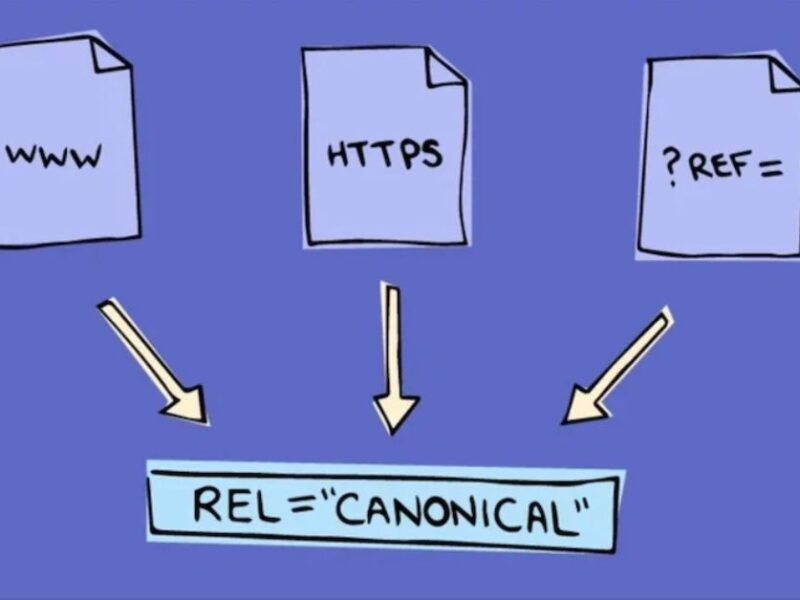
What Are Canonical Tags And Why They Matter In SEO?
Ever wondered why your website isn’t reaching the top of search engine results? You’re not alone. One culprit could be duplicate content issues, a common yet often overlooked SEO problem. But don’t worry, there’s a solution: canonical tags. These little HTML elements can be game-changers when it comes to boosting your site’s SEO rankings. But what are they exactly, and why do they matter so much? In this article, you’ll get an in-depth look at these questions and learn how to effectively use canonical tags on your website. From understanding their purpose and implementation to exploring future trends, we’ve got you covered. So buckle up; it’s time to dive into the world of canonical tags and improve your site’s visibility like never before! Understanding the Basics of Duplicate Content Issues Most people aren’t aware of the penalties for duplication. Don’t believe me? Check out Google’s Webmaster Guidelines; they explicitly warn against creating “duplicate content across many pages.” If caught, your site can suffer a significant drop in rankings or even face complete de-indexing. As you’re grappling with these potential consequences, it’s also essential to dispel some common ‘duplicate content myths.’ One such myth is that all types of duplication are penalised – which isn’t true. Not all duplicate content is intentional or manipulative; sometimes it’s merely a result of technical issues like URL parameters or printer-friendly versions of pages. Another pervasive myth is that using similar product descriptions on e-commerce sites will automatically lead to penalties. The truth? While unique descriptions are always best for SEO purposes, identical ones don’t necessarily spell disaster if they provide valuable information to users. Now that we’ve cleared up some misconceptions let’s focus on solutions: canonical tags. These nifty little HTML elements help search engines understand which version of a page should be considered the original – effectively …
Track Your Press Release HERE:

Decoding Server Response Codes (3xx, 4xx, 5xx) In SEO
Ever wondered what those mysterious numbers popping up in your SEO audit reports are? Those are HTTP status codes, and they’re crucial to understand if you’re serious about optimising your website. Let’s dive into the world of server response codes – specifically the 3xx, 4xx, and 5xx series – and decode their meanings. These little numbers can make a huge impact on your website’s performance and search engine ranking. They tell you about redirections, client errors, or server errors happening on your site. Ignoring them could lead to lost traffic or even penalties from search engines. But don’t worry! We’ve got you covered. In this article, we’ll break down these complex codes into digestible information so that you know exactly what they mean for your SEO strategy. Importance of Understanding HTTP Status Codes You’ll feel a whole lot more in control and less frustrated when you’ve got a solid grasp on HTTP status codes, as they’re the key to diagnosing and fixing issues that could be sabotaging your website’s SEO performance. Understanding these codes is not just about tackling technical glitches; it’s also about optimising your site for better visibility and higher ranking on search engine results pages (SERPs). HTTP status codes are three-digit responses that servers send whenever a user or a search engine tries to access a webpage. These responses fall under five distinct classes: 1xx (informational), 2xx (success), 3xx (redirection), 4xx (client error), and 5xx(server error). Code interpretation is crucial since different classes of codes have varying status impacts on your site’s SEO. For instance, ‘3xx’ redirection codes can impact how search engines index your site. A ‘301’ code indicates that the page has permanently moved to a new location, which allows link equity to pass on to the redirected page. However, excessive redirects can slow down your website, negatively affecting user experience and SEO. The ‘4xx’ client error codes signal problems …
Track Your Press Release HERE:

What XML Sitemaps Mean For SEO
You’ve probably heard the term ‘XML Sitemap’ tossed around in SEO circles, but what does it really mean for your website’s visibility? It’s time to demystify this crucial component of search engine optimisation. In this article, we’re going to break down the basics of XML language and delve into the importance of XML sitemaps for search engines. You’ll learn how to create a sitemap for your site and keep it updated regularly. We’ll also arm you with tools for generating XML sitemaps and tips on avoiding common errors. And most importantly, you’ll see real-world case studies showing the impact of XML sitemaps on website ranking. So don’t let jargon scare you off – understanding XML sitemaps is easier than you think, and it can make a big difference in your web traffic! The Role of Sitemaps in Website Optimisation In the world of website optimisation, sitemaps aren’t just a roadmap, they’re like a GPS guiding search engines to discover and index all corners of your site efficiently. They play an essential role in SEO strategy due to their ability to communicate directly with search engines. Imagine trying to find your way around a bustling city without a map; that’s how search engine bots feel when they come across websites without sitemap aesthetics. The aesthetic part doesn’t mean it has to look pretty for users but rather organised and easy for search engine bots to navigate. A well-structured XML sitemap can significantly enhance the indexing of your pages, allowing them to rank higher in SERPs (Search Engine Result Pages). It provides crawlers with critical data about your website pages: when they were last updated, the importance of each page relative to others on the site, and how often you expect changes might occur. User navigation is another crucial aspect where sitemaps are invaluable. Although primarily designed for search engines, sitemaps also improve user experience by providing visitors with an overview of your site’s content at a glance – …
Track Your Press Release HERE:

Understanding The SEO Implications Of Duplicate Content
Ever wondered why your website isn’t ranking high on search engine results, even though you’ve dotted the i’s and crossed the t’s in SEO? You might be dealing with duplicate content issues. Think of it as a pesky bug that’s nibbling away at your website’s visibility. This article will provide you an in-depth understanding of duplicate content and its implications for SEO. We’ll define what it is, help you recognise different types, and identify potential sources. By exploring the impact on search engine visibility and the role of canonical tags, we hope to arm you with effective strategies to prevent replication. Plus, we’ll introduce some handy tools for detecting similar texts. With real-life case studies and best practices for content creation thrown into the mix, you’ll come out equipped to tackle any duplicate content problems head-on. So let’s dive in! Defining the Concept of Repeated Materials Imagine you’re sifting through your website’s content, only to find the same phrases and paragraphs popping up like pesky weeds in a garden – that’s what we call duplicate content in the SEO world. It’s not an uncommon issue, but it is one that could seriously harm your site’s visibility and ranking on search engine results pages (SERPs). Duplicate content involves having identical or very similar materials within different sections of your website, or across various websites. This isn’t just about blatant copy-pasting; even subtle instances like structurally similar pages or near-identical product descriptions can fall under this category. You might be thinking, “Isn’t this just ‘Content Recycling’? Isn’t reusing material efficient?” Well, there’s a thin line between resourceful recycling and harmful repetition. While repurposing old blog posts into infographics or podcasts is considered smart reuse, duplicating material without significant modification isn’t seen as valuable by search engines – quite the opposite. Search engines aim to provide users with …
Track Your Press Release HERE:

An In-Depth Look At HTTP Headers And SEO X-Robots-Tag
If you’re keen on optimising your website for search engines, understanding the power of HTTP headers and SEO is crucial. You’ve probably heard about ‘X-Robots-Tag’, but do you know how it influences your site’s visibility? This article dives deep into this technical aspect, unravelling its role in metadata and its impact on crawlability and indexability. We’ll cover everything from the basics of website optimisation to an overview of directives like Noindex, Noarchive, Nosnippet, Unavailable_after, Noodp, and Noydir. It’s not just about knowing what these terms mean; it’s about comprehending their function in SEO strategy. So buckle up! As we delve into data-driven analysis, you’ll realise that there’s more to SEO than meets the eye. By mastering these areas, you can ensure that search engines understand your content better – enhancing your online presence effectively! The Basics of Website Optimisation When you’re optimising your website, it’s crucial to grasp the basics first, as these foundational elements can truly make or break your site’s search engine rankings. An understanding of website speed and mobile optimisation is vital to this process. Website speed refers to how quickly a web page loads when a user clicks on its link or types in its address. It’s not just about fast load times though; website speed also involves the smooth performance of all functions within the web page. Google has indicated that site speed is one of the signals used by its algorithm to rank pages. Pages with a longer load time tend to have higher bounce rates and lower average time on page, impacting negatively on your SEO performance. Mobile optimisation, on the other hand, ensures that web content can be easily accessed across multiple devices. This includes optimising your site design for different screen sizes and improving load times for users on mobile networks. Google’s introduction of mobile-first indexing means that it predominantly uses the mobile version of a …